Available on the Chrome Web Store

Block
distractions.
Use the time.

A blocker gives you time back.
Neurvane Focus helps you use it.

Block distracting sites, protect a focus session, and turn your goal into a clear next action.

  • No Neurvane account
  • Local-first
  • No API key needed
  • Desktop Chrome
Inside Neurvane Focusv1.3.5
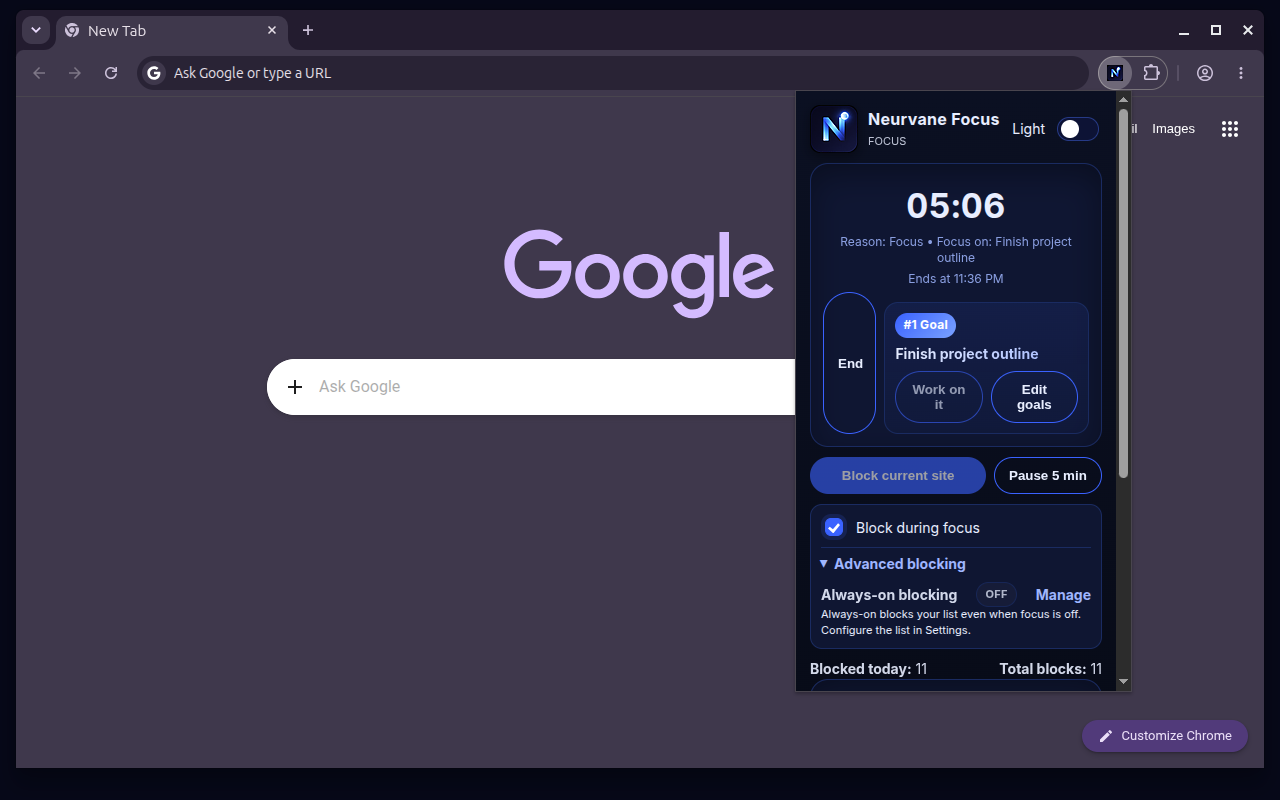
Neurvane Focus popup showing a 05:06 countdown and the number one goal: Finish project outline.
Your #1 goal. Right where you need it.ACTUAL PRODUCT
01 Protect your attention02 Plan your next action03 Get to work

See the shift

One session.
A clearer direction.

From a distracting tab back to the work you chose. Watch the real extension in 14 seconds.

Neurvane Focus in Chrome00:14 Silent demo
  1. 00:00

    Choose the work.

    Start a focus session with your #1 goal in view.

  2. 00:05

    Interrupt the detour.

    A blocked site brings you back to that goal.

  3. 00:12

    Find your next step.

    Open the local Pre-flight Check for a session recommendation.

Read the video description

A silent, 14-second recording of Neurvane Focus. A 25-minute focus session starts with “Finish project outline” as the #1 goal. Opening YouTube brings up the Stay focused page with the same goal and options to pause blocking, open settings, or run Pre-flight Check. The recording ends on the local Pre-flight Check, showing a session recommendation based on the reported state.

The missing half

Most blockers
stop at the block.

Closing a distracting tab is a start.
Knowing what to do next is what makes that time useful.

Neurvane Focus connects the boundary to the work: a protected session, a goal that stays visible, and a plan you can act on.

  1. 01

    Protect.

    Choose the sites that pull you away. Block them during focus, on a schedule, or with Always-On.

  2. 02

    Plan.

    Pick your priority. Use Pre-flight Check or the built-in coach to turn it into a manageable next action.

  3. 03

    Execute.

    Work through the session. When you drift, your #1 goal is there to bring you back. Take a break, then continue.

Built for the work in front of you

Enough structure.
Room to make it yours.

Start with a blocklist and a focus session. Add more guidance when you want it.

01 / PROTECT

Your boundaries.
Your rhythm.

Quick Block a distracting site, use a template, or build your own list. Then decide when blocking should happen.

  • Focus sessionsBlock while you work, with adjustable focus and break lengths or 25/5 mode.
  • Schedules & Always-OnProtect regular work hours, or keep chosen sites blocked outside focus sessions too.
  • More commitment, when you want itHard Mode prevents pausing or ending an active focus session and weakening its blocking settings.

Need a breather? Pause blocking for five minutes when Hard Mode is off. The focus timer keeps running.

Blocklist & schedule
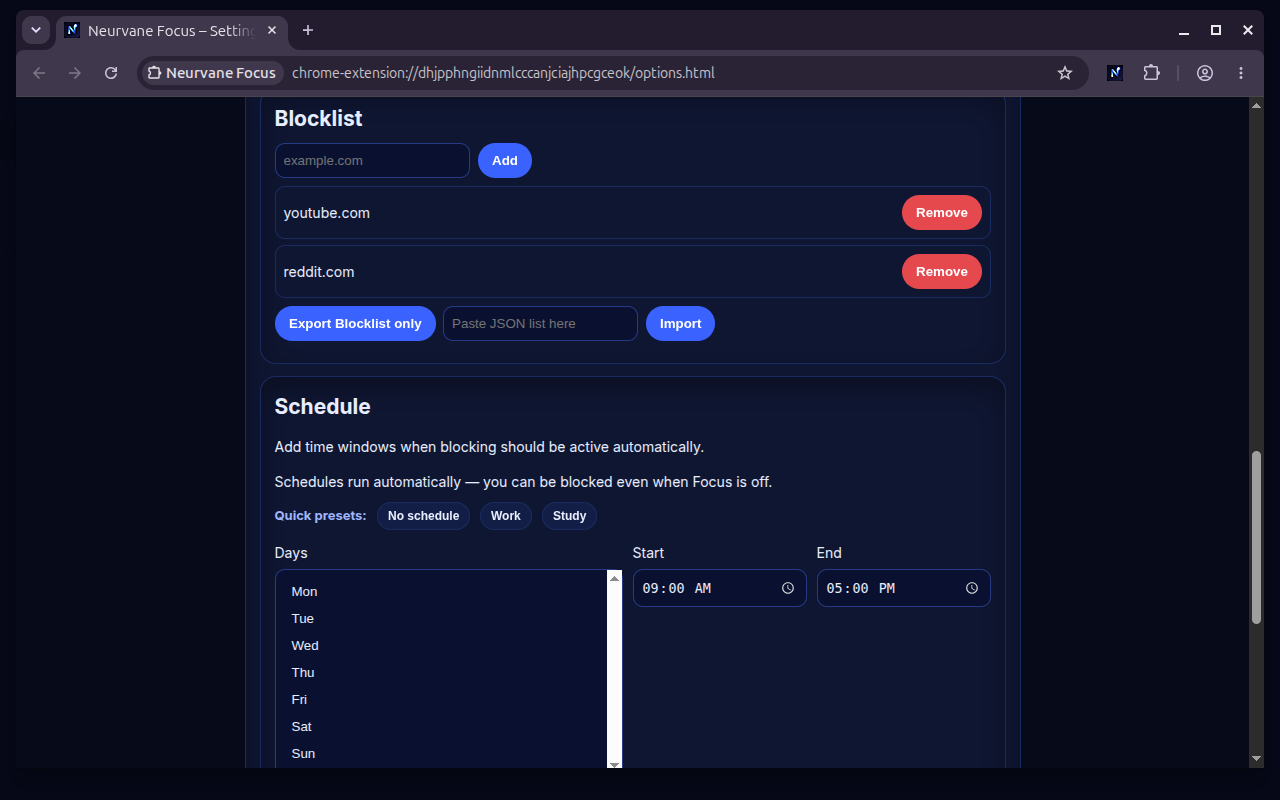
Settings showing a blocklist containing YouTube and Reddit, schedule presets, weekdays, and start and end times.
Choose the sites and the hours. View full screenshot

02 / PLAN Pre-flight · Beta

Make the next
action obvious.

A short readiness check turns your reported state, available time, and next action into a local session recommendation.

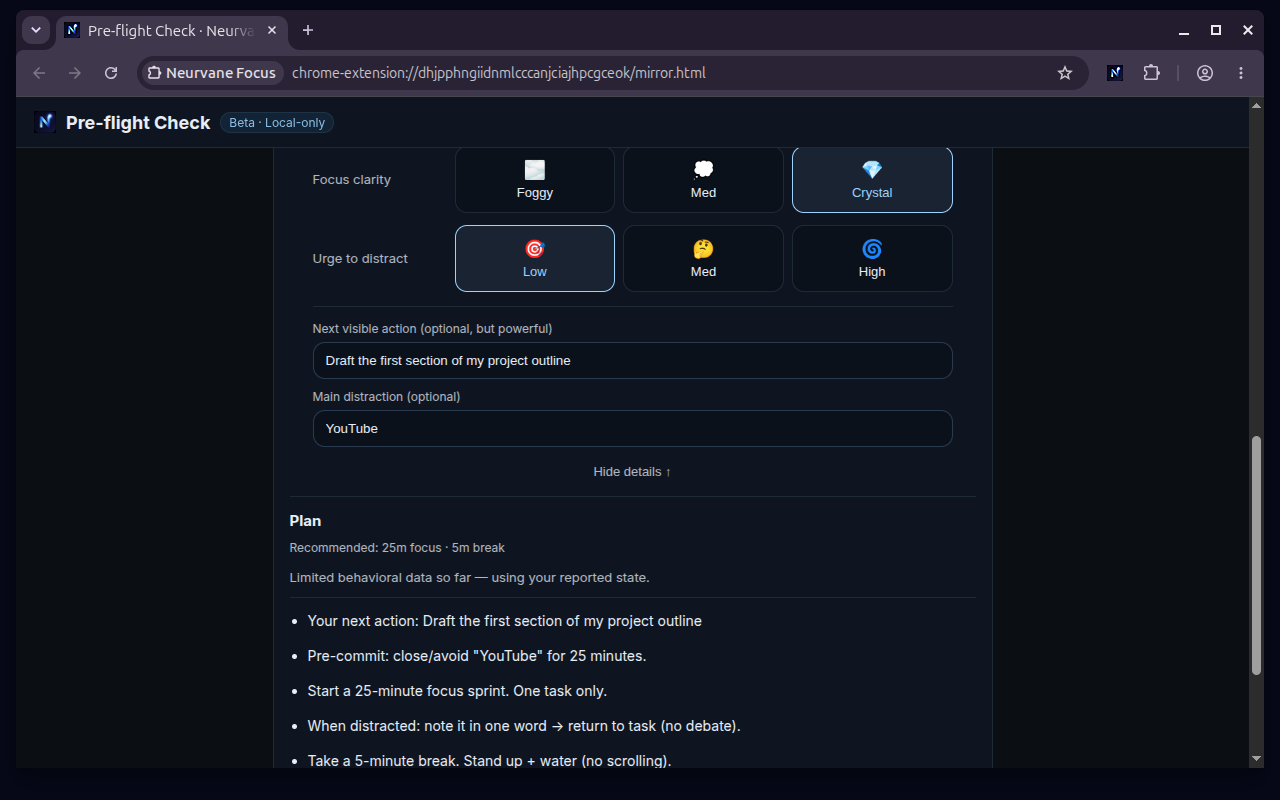
  • Start from where you areCheck in on energy, stress, clarity, and the urge to distract. Choose a concrete next action.
  • A plan with a stopping pointGet a suggested focus sprint and break, with simple steps to help you begin.
  • Guidance that can use your historyWith enough local history, Pre-flight can use your completion pattern for the current hour.
How does hourly personalization work?

After three focus sessions have been started in the same local hour, across any number of days, Pre-flight can use the started-versus-completed pattern for that hour. Until then, it uses your reported state. You can choose the current-state option or reset hourly personalization.

Pre-flight CheckLocal-only
Pre-flight plan: draft the first section of a project outline, avoid YouTube for 25 minutes, complete a focus sprint, then take a five-minute break.
A next action, a focus sprint, a break. View full screenshot

03 / EXECUTE

Keep the reason
in sight.

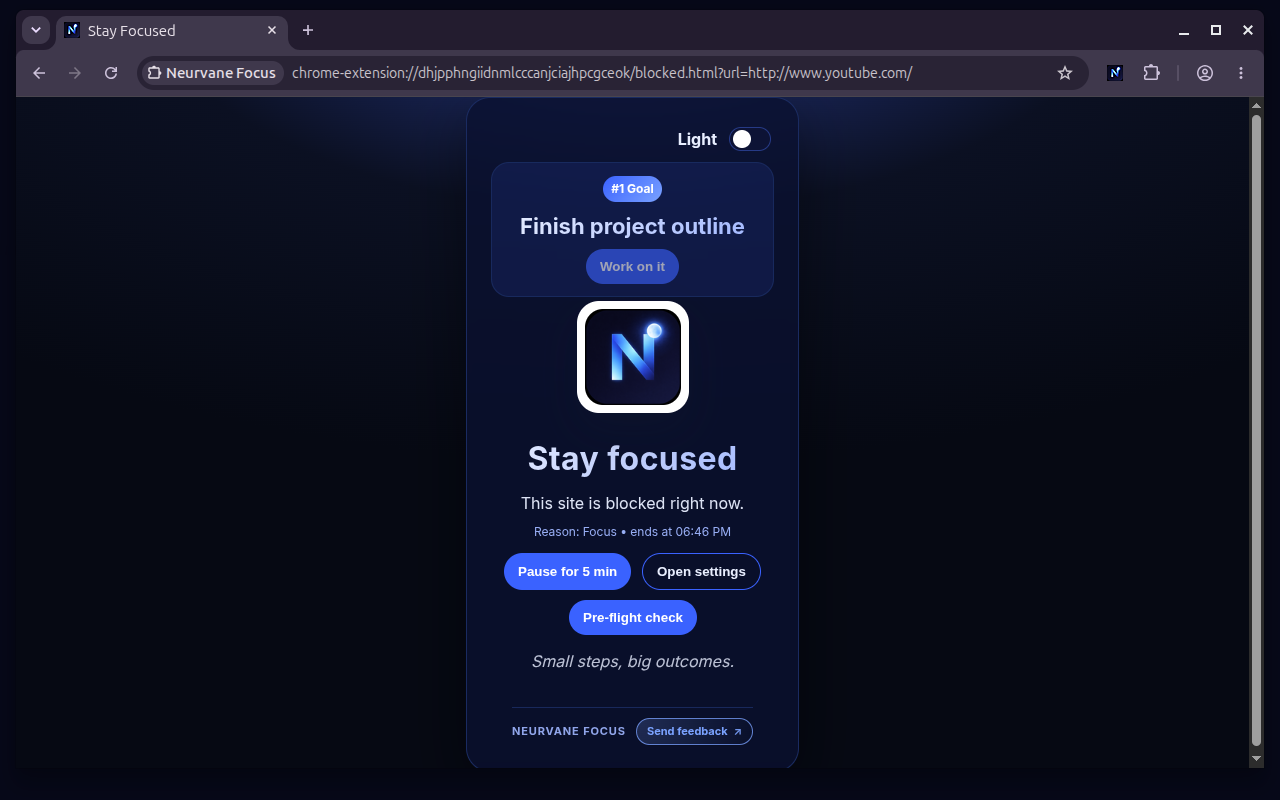
It is easier to return to the work when you can see what you meant to do. Set up to three prioritized goals; your #1 goal appears in the popup and on the blocked page.

  • A route back to your workAdd a link to a goal so “Work on it” can take you there.
  • Progress, kept locallySee completed focus sessions, focus minutes, block totals, streaks, and badges.
  • Small details that stay out of the wayKeyboard shortcuts, notifications, light and dark themes, and settings or blocklist export tools.

Progress reflects timer sessions and blocks. It does not measure the quality of your work or claim time saved.

When a distracting site is blocked
Stay focused page showing the number one goal, Finish project outline, above the blocked-site message.
A reminder of what you chose to do. View full screenshot

Guidance on your terms

A plan is built in.
External AI is optional.

You can get started without an API key. If you want an external coach, choose how to use it.

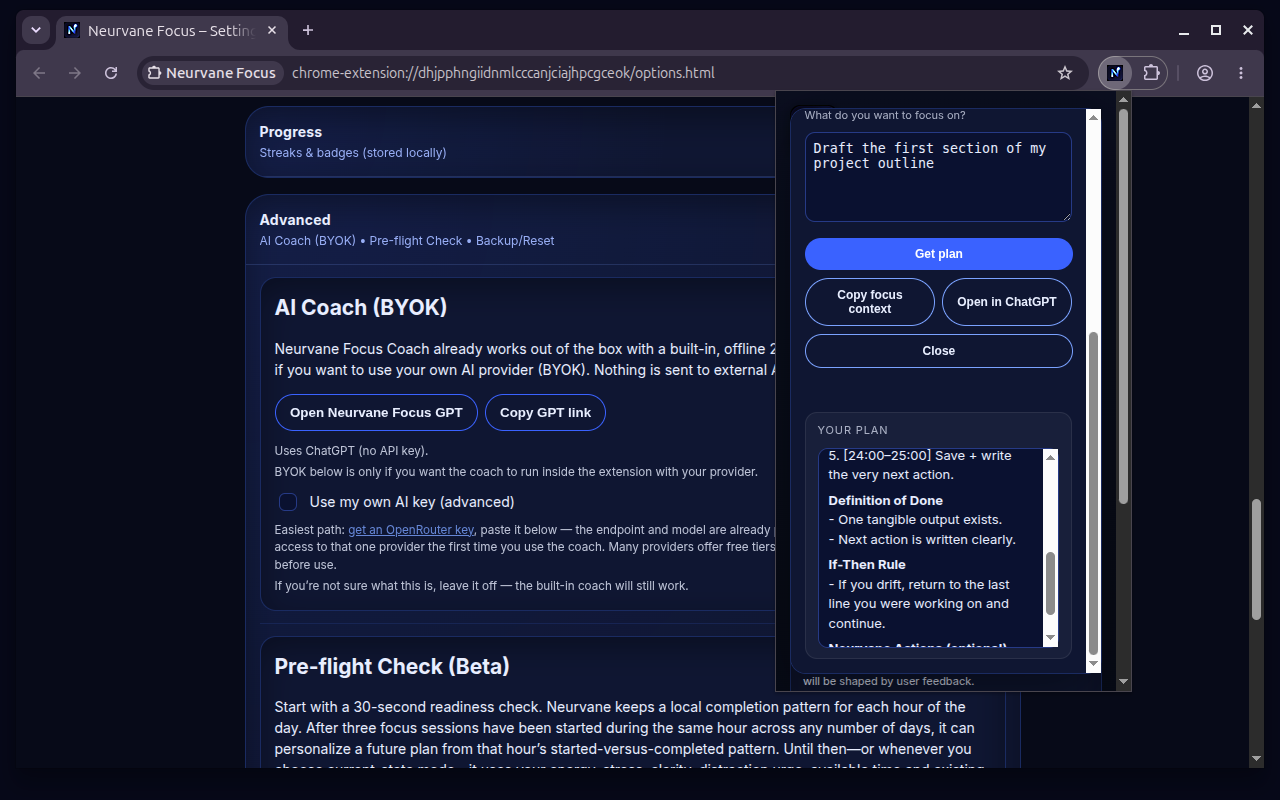
See the coach in the extension
BUILT IN

Local plan

A structured sprint plan, a definition of done, and an if-then rule. Works offline, without an AI key.

OPTIONAL

Bring your own AI key

Choose OpenRouter or OpenAI. When you request a plan, your task and time budget go to that provider. Its terms and any charges apply.

OPTIONAL

Continue in ChatGPT

Copy focus context and open the companion coach. You choose what to paste and send. ChatGPT’s own access requirements apply.

Local-first, by design

Your focus does not
need an audience.

No Neurvane account is required. Neurvane does not automatically receive your extension data.

Read the extension privacy policy
Local to your browser
Goals, focus statistics, badges, and minimized Pre-flight history are stored locally. Blocking processes URLs locally; it does not read page content.
Chrome Sync is separate
Chrome may sync settings such as your blocklist, schedule, and timer preferences. Neurvane does not receive that synchronized data.
You choose external processing
The built-in plan is local. Optional BYOK requests go to your selected provider. The ChatGPT flow uses your clipboard and requires you to paste and send.
Website email is separate, too
Product updates are optional and use the website’s email service. They are covered by the website privacy policy, not the extension’s.

Why I built it

Hristijan Zlatevski
Founder, Neurvane

Meet the founder

Built from a problem
I kept coming back to.

I spent years trying to protect deep work while balancing technical education, software development, and a family distribution business. Blocking distractions helped. I still needed a clearer way back to the work.

Neurvane Focus is my attempt to connect those two things. The first public version is free because I want real use and real feedback to shape what comes next. There is no perfect system for everyone. There is a better next iteration.

Read Neurvane Lab

Longer-form writing on focus and building Neurvane.

Help shape what comes next

Use it. Notice what helps.
Tell me what gets in the way.

Share feedback

Product updates

The useful updates.
When they matter.

Occasional emails about major Neurvane Focus releases and important product changes. Optional, and separate from Neurvane Lab.

A few useful answers

Before you begin.

Is Neurvane Focus free?

Yes. The current Neurvane Focus extension is free to use. Optional AI providers are separate services and may charge for their use. You do not need an AI key for the built-in plan.

Which browser does it work in?

Neurvane Focus is available for desktop Chrome, version 114 or newer, through the Chrome Web Store. Mobile Chrome does not support installing desktop extensions.

How is it different from a website blocker?

It connects blocking to what comes next: focus and break sessions, up to three prioritized goals, a #1 goal reminder, a local Pre-flight Check, and a built-in coach plan. The idea is to help you use the time you protect.

Do I need an account or an AI key?

No Neurvane account is needed. The core extension and built-in local plan work without an API key. BYOK coaching is optional. The separate ChatGPT companion follows ChatGPT’s own account and access requirements.

Why does it need access to websites?

When you enable blocking, Chrome asks you to grant Neurvane Focus access to all websites so your blocklist can work wherever you browse. Neurvane uses this access for local URL-based blocking and restoring tabs; it does not inject content scripts or read page content. See the extension privacy policy for the full permission and data explanation.

Does all my data stay on this device?

Goals, statistics, badges, and minimized Pre-flight history stay local. Chrome may sync some settings. Optional AI requests go to your chosen provider; the ChatGPT route uses explicit copy, paste, and send actions. Neurvane does not automatically receive your extension data.

Can I pause blocking?

Yes, for five minutes when Hard Mode is off. This pauses blocking, not the focus countdown. Schedules and Always-On may block sites even when a focus session is not running. Hard Mode prevents pausing or ending an active focus session.

What is Pre-flight Check?

An optional beta feature that helps you choose a session from your reported state or, with enough same-hour history, your local completion pattern. Enable it in settings. It is a planning tool, not a health assessment, and its data stays local.

Your next session starts here

Less detouring.
More doing.

Choose the work. Protect the time. Begin.

Add to Chrome Free

For desktop Chrome. No Neurvane account required.

Product screenshot

Full, unaltered product screenshot. Open full image